
The myth of vibecoding or why I built my own notes server (and why I'm keeping it)

I am using the voice capability of Claude a lot, but have one problem: Voice chat had no simple way to keep content: an idea, a list, or research results.
To save those as text I would have had to exit voice mode and use the text mode to ask Claude to create a .md file which I can download later on - a cumbersome process and as I work a lot by voice while driving it would have meant to find a place to stop.
I needed a place where Claude could write things down, find them again and update them.
Built somewhere between Valence and Annecy
So I built MCPnotes: a small notes server that speaks the Model Context Protocol (MCP). Any MCP-capable assistant can create, search, update and delete notes. Tags, version history with restore, and a one-time web link that opens a simple Markdown editor where I can read, edit and download everything.
And I did it on a drive through France because it was on that very ride that I ran into the problem.
I can build, but should I?
I did some light research for an existing tool before investing tokens and time (the new version of time and material) as I had already started projects only to learn that someone had already done the job, often better than me. I could not find a quick solution which satisfied me.
Once everything worked I red-did the resarch and compared four of them with MCPnotes:
- Hjarni, a Markdown knowledge base with a built-in MCP server, built by a solo developer in Belgium
- madlit, a Markdown notes app with a remote MCP server and OAuth
- Voicenotes, voice-first, with semantic search over your recordings
- the Notion MCP server
The good thing is: MCPnotes is still unique ;) and not completely pointless.
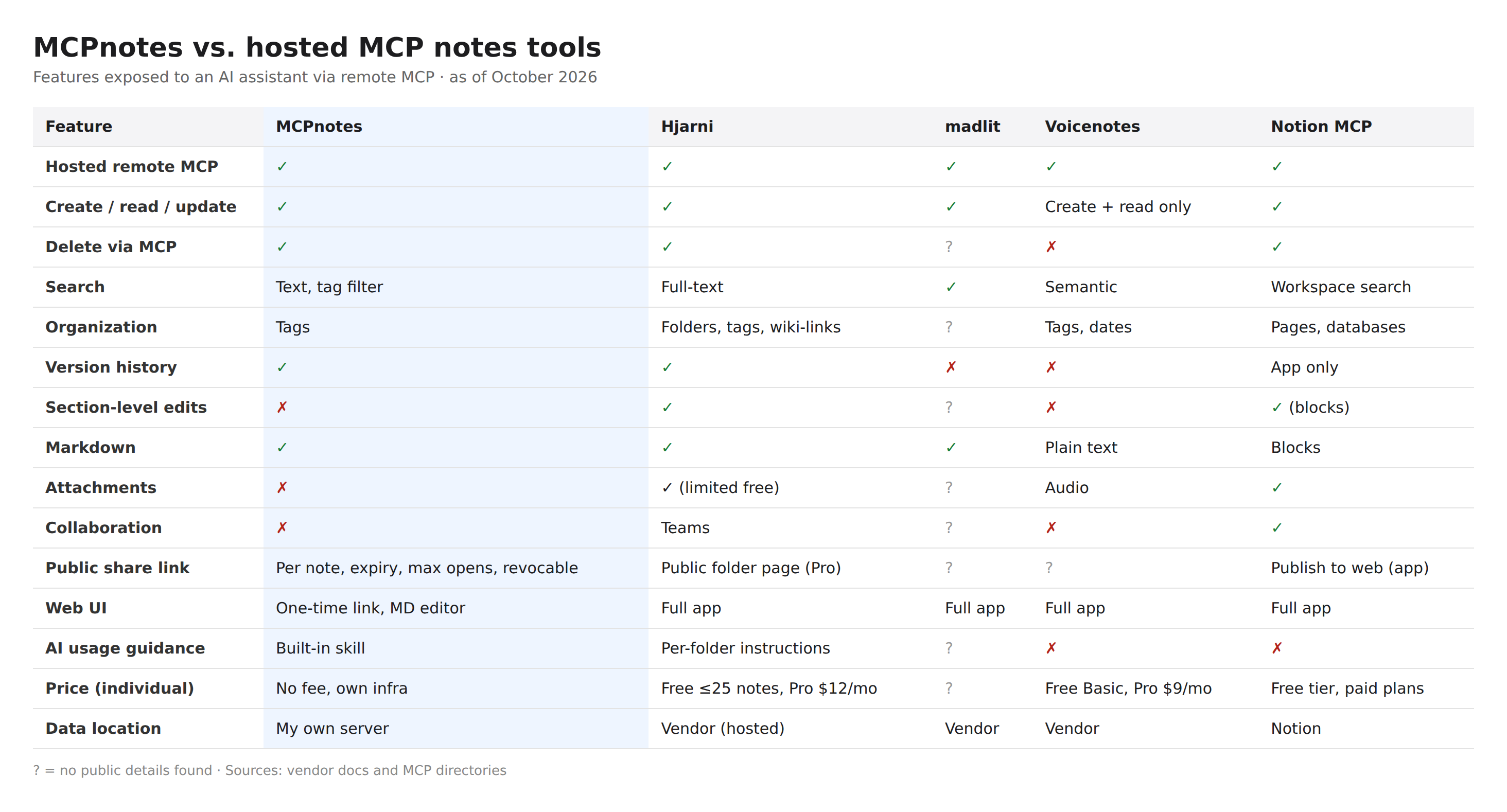
To me, version history was important - I wanted to avoid that a crazy Claude deletes work by accident and the cost of keeping versions of text files is marginal. I did not want to handle attachments because my focus is on text. And finally, I see no need right now for collaboration, but it's easy to add.
One thing which happened during the development process and which was impressive was Claude giving feedback to Claude. When I had connected the MCP server, edits were super slow - I complained to Claude about the slowness and the AI agent explained that the MCP server only allows it to work in a certain way; I asked Claude to specify what would make it faster and pasted the feedback into claude code - which praised the qualified feedback and could implement the missing functions.
Why I'm sticking with MCPnotes
I will keep using MCPnotes but because it fits my use case:
What speaks for it:
- It is mine. I decide what it does, and nothing changes underneath me because a vendor pivots.
- It is super simple. A handful of tools, tags instead of folder hierarchies, and the assistant knows how to use it through a built-in usage guide.
- It is versatile. Any MCP client can use it: chat, voice, my own agents. Version history means an over-eager AI edit is one restore away.
- It runs at a marginal cost I honestly cannot calculate. One more note costs nothing measurable on infrastructure I already run.
- I know where my data is. My notes sit on a server I chose, not in a large platform whose terms of service decide who gets to read them. Who knows what an advertising company reads in your shopping lists and meeting notes. I prefer not to have to wonder.
What speaks against it:
- No collaboration. Others can read a note through a share link, but nobody edits with me, and Notion or Hjarni are far ahead for teams.
- No attachments, no wiki-links, no section-level edits. An update replaces the whole note.
- Search is plain text, not semantic. Voicenotes finds "ideas about onboarding" even when I never said the word.
- I am the operations team. Security, backups and uptime are my problem, not a vendor's.
- The web interface is deliberately minimal. A one-time link is elegant for an agent workflow, and less so if you just want to open your notes on a phone.
For a team, I would most likely recommend one of the others. For my own thinking out loud, the trade-off works.
The myth of vibecoding
When developing such a small tool, I rely on a lot of work others have been doing before. There's the superpowers plugin which I can highly recommend in the creative process and the development. Then, there's my infrastructure. I have a server, I have an internet domain and if I want to, I can add a new domain in a few minutes. I know how to get SSL-certificates, I have infrastructure to send and receive emails without headache, and finally I could base the tool on research and development I did before.
You can vibecode without all of these things, if you solve the problems one by one and that is doable - it is work however, to get everything sorted out and up and running and the myth of "I quickly code this" is only true if your environment is ready or if you chose on purpose a specific environment for the problem.
#geekstuff #MCP #AI #buildvsbuy